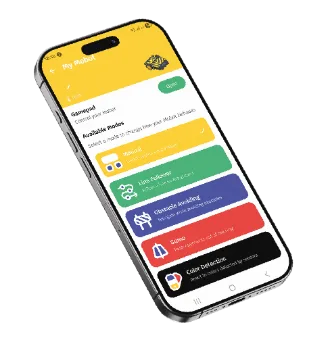
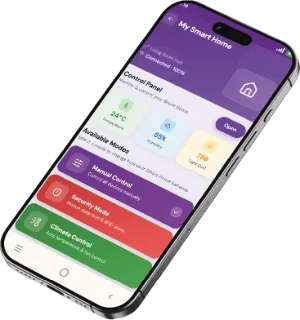
The mobile app

The robot in one hand.
The phone in the other.

No setup: switch on the robot, open the app, drive. Modes launch from a single button.

Included with every MoBot kit
App Store Google Play Download APK 2.0.0 · 14.5 Mo Coming soon
The mobile app
The modes, kit by kit

The modes, kit by kit

Each kit has its own modes. The app only shows the ones for your robot.

Smart Car Mini

  • Manual driving
  • Programmable Sequence
  • Police mode
  • Ambulance mode
  • Piano mode

Smart Car

  • Manual driving
  • Line follower
  • Obstacle avoidance
  • Stay in the Ring
  • Colour detection

Smart Home

  • Weather station
  • Security mode
  • Gas detection
  • RFID access
  • Smart lighting
Connecting to the robot

Connecting to the robot

  1. 01

    Switch on the robot with the board's power switch.

  2. 02

    Turn on Bluetooth on the phone.

  3. 03

    Open the app and pick your kit from the list.

Requirements

  • Bluetooth on the phone
  • iOS  — Minimum version to be confirmed
  • Android  — Minimum version to be confirmed

Full access comes from activating.

Some tutorials are open to everyone. The rest, along with the tracks and the certificate, opens up when you activate the code on your card.

Activate my kit